HOME > BLOG > JaroEducation > Constraints in SQL: Types, Examples, and How to Use Them
JaroEducation
Constraints in SQL: Types, Examples, and How to Use Them
J
By Jaro Education
March 25, 20263 min read
Last updated on June 22, 2026
SHARE THIS ARTICLE
Table Of Content
What Are Constraints in SQL?
Why Are SQL Constraints Important?
Types of Constraints in SQL
Modern applications rely heavily on databases to store and manage information. Whether it’s an e-commerce platform tracking orders, a banking system managing transactions, or a hospital database storing patient records, maintaining data accuracy and integrity is essential.This is where constraints in SQL play a crucial role.Constraints are rules applied to database tables that ensure only valid and reliable data is stored. They prevent incorrect, duplicate, or inconsistent values from being inserted into the database. Without constraints, databases could quickly become filled with inaccurate or unusable data.For example:
A user ID should be unique
A product price should not be negative
An order should always be linked to a valid customer
By enforcing such rules, SQL constraints help maintain the quality and reliability of the data stored in a system.In this guide, readers will learn:
What constraints in SQL are
The type of constraint in SQL used in databases
How constraints enforce data integrity
Practical examples, including the SQL unique constraint and check constraint in SQL
How to implement constraints while creating or modifying tables
Understanding SQL constraints is essential for anyone working with databases, including developers, data analysts, and data engineers.
What Are Constraints in SQL?
Constraints in SQL are rules applied to columns or tables to control the type of data that can be stored in a database.
These rules help enforce data integrity, ensuring that information stored in the database is accurate, valid, and consistent.
*EDUCBA
When a constraint is applied to a column or table, the database management system automatically checks every insert or update operation to ensure the rule is not violated.
For example:
Prevent duplicate values in a column
Ensure a column cannot contain NULL values
Verify that a value falls within a specific range
If a user attempts to insert data that violates a constraint, SQL will reject the operation and return an error.
This automatic enforcement is what makes constraints extremely powerful in maintaining reliable databases.
Why Are SQL Constraints Important?
Database constraints are essential because they protect the integrity and reliability of stored data.
Without proper constraints, databases may contain duplicate records, invalid values, or inconsistent relationships between tables.
Here are some major benefits of using constraints in SQL.
1. Ensures Data Accuracy
Constraints prevent invalid or incorrect data from being inserted into tables. For example, a check constraint in SQL can ensure that an employee’s salary is always greater than zero.
2. Prevents Duplicate Data
The SQL unique constraint ensures that certain fields, such as email IDs or employee numbers, remain unique.
3. Maintains Relationships Between Tables
Constraints such as foreign keys help maintain relationships between different database tables.
4. Improves Data Consistency
By enforcing predefined rules, constraints ensure that data remains consistent across the database.
5. Reduces Application Errors
When constraints enforce rules at the database level, developers don’t have to rely entirely on application code for validation.
Types of Constraints in SQL
Understanding the type of constraint in SQL is important for designing reliable databases.
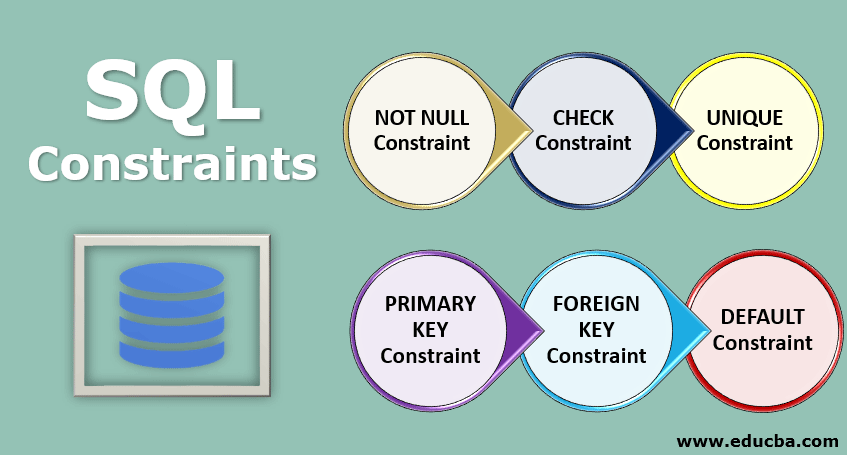
SQL provides several built-in constraints that help enforce data integrity.
Below are the most commonly used SQL constraints.
1. NOT NULL Constraint
The NOT NULL constraint ensures that a column cannot store NULL values.
When this constraint is applied, every row must contain a value for that column.
Example CREATE TABLE Employees ( EmployeeID INT NOT NULL, Name VARCHAR(50) NOT NULL, Department VARCHAR(50) );
In this example:
EmployeeID cannot be NULL
Name cannot be NULL
Department may contain NULL values
This constraint is commonly used for mandatory fields such as IDs or names.
2. UNIQUE Constraint
The SQL unique constraint ensures that all values in a column are different from each other.
Trying to insert the same email again will produce an error.
3. PRIMARY KEY Constraint
The primary key constraint uniquely identifies each record in a table.
It combines two important rules:
Values must be unique
Values cannot be NULL
Each table can have only one primary key.
Example CREATE TABLE Orders ( OrderID INT PRIMARY KEY, CustomerName VARCHAR(50), OrderDate DATE );
Here:
OrderID uniquely identifies every order.
Primary keys are fundamental for creating relationships between database tables.
// server.mjs import { createServer } from ‘node:http’;const server = createServer((req, res) => { res.writeHead(200, { ‘Content-Type’: ‘text/plain’ }); res.end(‘Hello World!\n’); });// starts a simple http server locally on port 3000 server.listen(3000, ‘127.0.0.1’, () => { console.log(‘Listening on 127.0.0.1:3000’); });// run with `node server.mjs`

 March 25, 2026
 3 min read













 ROI Calculator